
(If you already have an RSign or Docusign account added to Rentman you can send the Information Sheet via those but you don’t need a signature and it may waste your existing quota. Update: See blog post on 15 April for caveat)
Next version of Rentman (5.003.363) has a new list showing tenants who have not yet been sent this document and the ‘send’ button has options to choose between sending via regular email, RSign, Docusign and RMail.
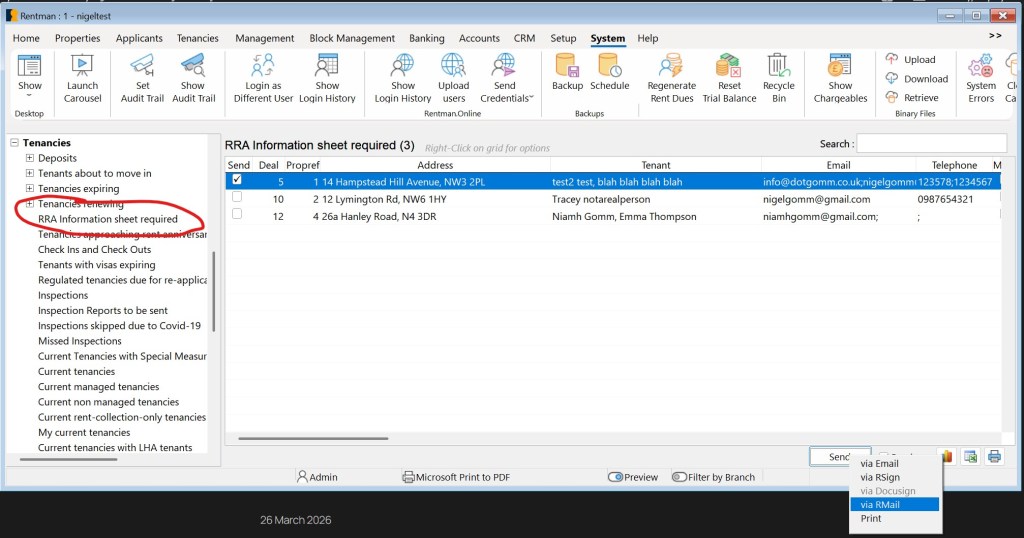
All current tenancies are shown but only managed tenancies are ticked to send. You are required to send to all managed tenancies even if the landlord has already sent the information sheet themseleves. You are not required in law to send to Let Only tenancies but you may offer this service to landlords so they are also on the list (right click the send checkbox to select all),
Edit : See post on 22 April for more on this.
There is a new ‘package’ with a cover letter being sent. You have the ability to customise the document ‘RRA Cover Letter’ and add other documents if you wish. The government’s Information Sheet is downloaded and included in the package.
Note : The guidance says you have to serve this information sheet on “each tenant”. People are interpreting this to mean each individual making up “the tenant”. But “jointly and severally” still applies. So the email/envelope must be addressed to all individuals BUT it only needs be received by one of them to be considered received by all. We still recommend sending to each individual but where you don’t have an email address for one of them or an email is undelivered it shouldn’t matter if at least one email was delivered.


Leave a reply to RRA Information Sheets – Nigel's Rentman blog Cancel reply